A smart lock without Wi-Fi can make your front door easier to access without adding cloud accounts, subscription fees, or complicated connectivity. These locks rely mainly on keypads, fingerprints, physical keys, or local controls.
We selected 10 popular options with different entry methods, security features, installation styles, and price points so you can find the right fit for your home.
Best 10 Smart Lock Without Wifi Picks for 2026
Best Traditional Keypad Pick

- 20 user codes plus one-time guest codes
- Auto-lock, one-touch lock, and anti-peep PIN entry
- IP54 rating with two backup keys
Best For: Families and rentals wanting offline keypad access
Best Fingerprint Value
Veise KS02A Fingerprint Deadbolt

- Stores 20 fingerprints and 20 passwords
- Fingerprint, keypad, one-time code, and key entry
- Local storage with auto-lock and passage mode
Best For: Busy families wanting fast offline fingerprint access
Best Handle Lock
NICE DIGI Z1A Keypad Door Lock

- No app, Wi-Fi, or Bluetooth required
- 20 codes with temporary-code support
- Reversible handle, passage mode, and backlit keypad
Best For: Rentals and high-traffic doors needing a keypad handle
Best Fingerprint Deadbolt

- 20 fingerprints and 20 passcodes
- Fingerprint unlocking in about one second
- Anti-peep PINs, silent mode, and away mode
Best For: Homeowners wanting versatile offline biometric entry
Best Overall

- 20 user codes plus one-time guest codes
- ANSI Grade 3 security with IP55 resistance
- Auto-lock, anti-peep entry, and backup keys
Best For: Families, rentals, and exterior doors
Best Door Knob

- 20 codes plus one-time guest access
- 5–99-second adjustable auto-lock
- Backlit keypad with two backup keys
Best For: Front doors needing an easy keypad knob
Best Security Features
Veise RZ-A Electronic Deadbolt

- 20 codes, one-time codes, and backup keys
- Three-minute lockout after 10 failed attempts
- Vacation, silent, and anti-peep modes
Best For: Security-focused homeowners wanting local controls
Best Multi-Access Option
Veise RZ07 Fingerprint Smart Lock
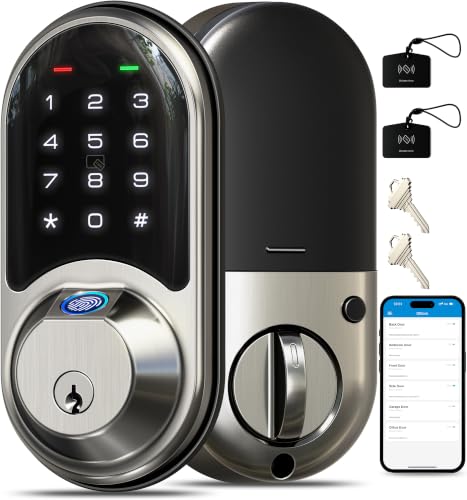
- Seven access methods, including fingerprint
- Supports extensive user and code management
- Gateway required for remote smart-home features
Best For: Families, rentals, and hosts managing multiple users
Best Budget Keypad Pick
Amazon Basics Electronic Deadbolt

- Six user codes plus single-use codes
- Adjustable 10-to-99-second auto-lock
- Keypad and traditional-key operation
Best For: Basic guest access on residential or commercial doors
Best Traditional Keypad Pick – TEEHO TE001 Keypad Deadbolt
If you want a smart lock without wifi, the TEEHO TE001 provides straightforward keypad entry without app or network setup. It supports multiple user codes, one-time guest access, auto-lock, and physical-key backup for everyday front- or back-door use.
Best For: Families, rentals, and homeowners who want dependable keypad access without connected features.
Pros:
- Stores up to 20 user codes and supports one-time guest codes.
- Offers configurable auto-lock, one-touch locking, and anti-peep password protection.
- Includes IP54 weather resistance, low-battery alerts, and two backup keys.
- Installs with a screwdriver and includes a two-year warranty.
Cons:
- Requires four AA batteries, which are not included.
- Fits 2-1/8-inch door holes only and requires a reset before first use.
- ANSI Grade 3 security is designed for standard residential use rather than higher-grade applications.
The TE001 is a practical choice when simple code-based entry matters more than remote control. Its temporary-code and auto-lock features add convenience while preserving an offline setup.
Best Fingerprint Value – Veise KS02A Fingerprint Deadbolt
The Veise KS02A is a smart lock without wifi that adds fingerprint entry to traditional keypad and key access. Its local, on-device recognition supports family access while keeping codes and lock information stored locally.
Best For: Busy households that want fast fingerprint unlocking with keypad and physical-key alternatives.
Pros:
- Stores up to 20 fingerprints and 20 passwords, plus one-time codes.
- Fingerprint unlocking is designed to recognize users in about 0.2 seconds.
- Provides auto-lock, one-touch locking, passage mode, silent mode, and vacation mode.
- Offers ANSI Grade 3 and BHMA certification, IP54 protection, and local data storage.
Cons:
- Four AA batteries are required and not included.
- Compatibility is limited to 2-1/8-inch lock holes and standard door thicknesses from 1-3/8 to 2 inches.
- Fingerprint features may be more than needed for users who prefer simple PIN entry.
With several offline entry methods and local information storage, the KS02A is a strong option for households sharing access frequently. Its fingerprint sensor can reduce the need to remember or enter codes.
Best Handle Lock – NICE DIGI Z1A Keypad Door Lock
For shoppers seeking a smart lock without wifi and a built-in handle, the NICE DIGI Z1A combines passcode entry with a reversible lever. It needs no app, Wi-Fi, or Bluetooth and includes passage mode for situations when the door should remain unlocked.
Best For: Front doors, apartments, offices, bedrooms, and rentals needing a complete keypad-handle replacement.
Pros:
- Creates up to 20 personalized 4–8 digit codes and supports temporary codes.
- Includes a reversible handle for left- or right-handed doors and two backup keys.
- Offers auto-lock from 5–99 seconds, one-touch locking, and passage mode.
- Uses a backlit keypad and provides IP54 weather resistance.
Cons:
- Four AA batteries are required and not included.
- It is a handle-based lock, so it may not suit doors set up for a separate deadbolt-only replacement.
- Battery life is listed at 8–12 months, shorter than the approximately one-year claims of some deadbolt models.
The Z1A stands out when you need both a keypad and a handle in one installation. Its offline design and passage mode make it especially useful for rentals, offices, and high-traffic doors.
Best Fingerprint Deadbolt – TEEHO TE002 Fingerprint Lock
The TEEHO TE002 pairs fingerprint entry with keypad access for shoppers who want a smart lock without wifi. It provides several offline ways to unlock, along with anti-peep PIN protection, wrong-entry lockout, and configurable auto-lock.
Best For: Homeowners who want quick fingerprint access plus codes and physical-key backup.
Pros:
- Supports up to 20 fingerprints, 20 passcodes, one-time PINs, and two physical keys.
- Fingerprint recognition is designed to unlock in about one second.
- Includes anti-peep passwords, wrong-password lockout, silent mode, and away mode.
- Offers IP54 weather resistance, low-battery alerts, and a two-year warranty.
Cons:
- Requires four AA batteries, which are not included.
- Fits 2-1/8-inch door holes only.
- Users must manage fingerprints and codes locally rather than through a connected app.
The TE002 is a well-rounded offline deadbolt for households that want fast entry without relying on phones or wireless service. Its combination of biometric, PIN, and key access makes it flexible for family and guest use.
Best Overall – Veise VE001 Keypad Deadbolt
The Veise VE001 is a practical smart lock without WiFi for households, rentals, and exterior doors. It offers keypad entry, temporary codes, automatic locking, and a physical-key backup without requiring an app or wireless connection.
Best For: Families, rental properties, and homeowners who want flexible code access with strong weather resistance.
Pros:
- Supports up to 20 user codes plus one-time codes.
- Adjustable 10–99-second auto-lock timer and one-touch locking.
- ANSI/BHMA Grade 3 security, IP55 weather resistance, and anti-peep password entry.
- Includes low-battery alerts and two backup keys.
Cons:
- Four AA batteries are required but not included.
- Installation is intended for compatible standard U.S. doors with 2-1/8-inch holes.
- It does not provide WiFi-based remote access or app control.
With temporary-code support, long stated battery life, and a durable exterior design, the VE001 is a well-rounded choice when you want keyless convenience without WiFi dependence.
Best Door Knob – Yamiry Keypad Smart Door Knob
The Yamiry YR04 is a convenient smart lock without WiFi for front doors where a keypad knob is preferable to a deadbolt. It combines code entry, key access, automatic locking, and a backlit keypad in a screwdriver-friendly design.
Best For: Homeowners seeking an easy-to-install keypad door knob with multiple user codes.
Pros:
- Stores up to 20 codes and supports one-time guest codes.
- Adjustable 5–99-second auto-lock feature can also be disabled.
- Backlit keypad, low-battery indicator, anti-pry code feature, and IP54 weather resistance.
- Includes two physical keys and is designed for installation with a screwdriver.
Cons:
- Its knob format may not suit doors that require a separate deadbolt.
- Four- to eight-digit code entry may be less flexible than some keypad systems.
- The product notes list WiFi as a connectivity protocol, but the supplied features describe local keypad and key operation rather than remote WiFi control.
The YR04 makes sense for buyers who want a straightforward electronic knob and do not need remote access. Its adjustable auto-lock and generous code capacity add useful everyday flexibility.
Best Security Features – Veise RZ-A Electronic Deadbolt
The Veise RZ-A is a smart lock without WiFi focused on keypad convenience and added local security controls. It provides permanent and one-time codes, wrong-entry lockout, vacation mode, silent mode, and physical-key access.
Best For: Homeowners who prioritize local access control, tamper-resistance features, and quiet operation.
Pros:
- Supports 20 permanent codes, one-time codes, and two spare keys.
- Locks out keypad entry for three minutes after 10 failed attempts.
- Includes vacation mode, silent mode, anti-peep password entry, and low-battery alerts.
- BHMA-certified, ANSI Grade 3-tested construction with IP54 weather resistance.
Cons:
- Door handle is not included.
- Four AA batteries are required and not included.
- It does not offer app-based or remote WiFi control.
The RZ-A stands out for buyers who want more than basic keypad entry. Its failed-attempt lockout and vacation mode provide useful local protections, while the standard installation approach keeps setup accessible.
Best Simple Keypad Pick – Yale Code Digital Keypad Deadbolt
If you want a smart lock without Wi-Fi, the Yale Code keeps things straightforward: install it, create entry codes, and unlock the door from the backlit keypad. There is no app or phone setup to manage.
Best For: Households that want keyless entry and multiple access codes without connected features.
Pros:
- Creates up to 20 unique entry codes directly on the lock.
- Auto-lock secures the deadbolt after you leave.
- Includes a backlit keypad, backup key, low-battery alerts, and Grade 3 certification.
Cons:
- No app, phone control, or Wi-Fi connectivity.
- Uses code entry rather than fingerprint or fob access.
The Yale Code is a practical choice when reliability and simple local control matter more than remote access. Its backup key and weather-resistant design add useful everyday reassurance.
Best Multi-Access Option – Veise RZ07 Fingerprint Smart Lock
The Veise RZ07 is a smart lock without Wi-Fi when used through its local fingerprint, keypad, fob, or mechanical-key options. It also supports app and web management, while remote access and smart-home integration require the separately sold gateway.
Best For: Families, rentals, and hosts who want fingerprint entry plus detailed user and code management.
Pros:
- Offers fingerprint, app, web portal, fob, code, eKey, and mechanical-key access.
- Stores up to 50 fingerprints and supports 250 or more user codes.
- Includes auto-lock, access management, low-battery alerts, and IP55 weather resistance.
Cons:
- The gateway is sold separately for remote access and Alexa or Google integration.
- Setup requires careful app pairing and protected wiring.
- More features may mean a steeper setup process than a basic keypad lock.
Choose the RZ07 if flexible entry methods and user administration are priorities. It is especially capable for shared homes and rentals, but buyers should account for the separate gateway if they need remote control.
Best Budget Keypad Pick – Amazon Basics Electronic Deadbolt
For shoppers seeking a smart lock without Wi-Fi, this Amazon Basics electronic deadbolt provides touch-control keypad entry with no connected setup mentioned. It combines customizable codes with a traditional exterior key and interior thumb turn.
Best For: Residential or commercial doors needing basic keypad access and temporary guest codes.
Pros:
- Supports six user codes plus temporary single-use codes.
- Auto-lock can engage 10 to 99 seconds after entry.
- Fits standard door preparations from 1-3/8 to 1-3/4 inches and includes traditional keys.
Cons:
- Offers fewer permanent user codes than the Yale model.
- No app, fingerprint access, or remote-control features are listed.
- Initial setup requires changing the default programming code and user code.
This lock suits buyers who want uncomplicated keypad access at a familiar deadbolt format. Its single-use codes are useful for guests, while the key override preserves a conventional entry option.
How We Picked the Best Smart Lock Without Wifi
We compared these locks by focusing on the features that matter most for local, app-free access: keypad usability, fingerprint performance, mechanical key backup, user-code capacity, auto-lock settings, battery warnings, weather resistance, and installation requirements. We also considered ANSI security ratings where listed, since a lock’s electronic features do not replace the importance of solid mechanical construction.
Because product configurations can vary, confirm the current specifications, included hardware, door-thickness range, and battery requirements before ordering. A lock designed for a standard single-bore door may not fit every existing setup.
Quick Comparison
- Best for basic keypad entry: TEEHO TE001, Veise VE001, or the Amazon Basics keypad deadbolt.
- Best for fingerprint access: TEEHO TE002 or Veise KS02A.
- Best for a built-in handle or knob: the keypad lock with handle or Yamiry keypad knob.
- Best for established-brand appeal: Yale Digital Keypad Deadbolt.
- Best for temporary access codes: Veise RZ-A or Amazon Basics models with one-time-code support.
- Not ideal for a strict no-Wi-Fi setup: the Veise RZ07, because its listed app-control features add connected functionality.
Key Buying Factors for a Smart Lock Without Wi-Fi
Entry Method
Keypad locks are usually the simplest choice for families and rentals because codes are easy to share and do not require carrying a key. Fingerprint models can be faster for regular users, but performance may vary with wet, dirty, or worn fingers. Keep a physical-key backup available whenever possible.
Security and Door Compatibility
Look for an ANSI grade when available, and verify that the deadbolt, strike plate, and door frame are compatible. A strong electronic lock cannot compensate for a weak frame or loose installation. Measure your backset and door thickness before buying.
Battery Life and Low-Battery Access
Check how many batteries the lock uses, whether it provides a low-battery alert, and whether emergency power contacts or a backup key are included. Auto-lock is convenient, but it can lock the door unexpectedly, so choose a delay that suits your household.
Codes, Privacy, and Weather Protection
More user-code capacity helps households, guests, cleaners, and short-term access. Anti-peeping input is useful in public view. For exposed doors, compare the listed IP rating and install the lock according to the manufacturer’s weather guidance.
Who Should Buy Which Smart Lock Without Wifi?
Choose a basic keypad deadbolt if you want dependable keyless entry with minimal setup. Select a fingerprint deadbolt if fast personal access matters more than sharing codes. A knob or handle model may suit doors where replacing the existing hardware is preferable to installing a separate deadbolt.
For landlords, hosts, and households that frequently grant temporary access, prioritize one-time codes and easy code management. Buyers who value brand familiarity may prefer Yale, while budget-focused shoppers should compare the included features, warranty, and installation hardware rather than choosing on price alone. If remote control, notifications, or access from away from home are essential, a Wi-Fi or hub-connected lock—not a strictly offline model—will be a better match.